
Click the button and follow the instructions
below to setup the sytem:
Sign-Up for Notion (The tool in witch HappyCatalogue is build)
You need a Notion Account to be able to use the Template, you can signup for free, do not worry, it is not a trial.
Come back to this page and click the last button below at the bottom of this page (Button 2).
If you’re anything like me, then from the moment you hit that ‘buy’ button online,
you’re staring out your front room window waiting for the delivery person to drop off your package!
Well today, I’ve hooked you up with expedited delivery…your HappyCatalogue CRM is here!
Simply click>> here<<, or click the button below to Get Acces to the HappyCatalogue CRM System.
I’m super excited to get this HappyCatalogue CRM into your hands because
it’s going to help you organize your property information & manage your business
just from one central hub.
To get the System:
If you do not already have Notion, go through the signup process and answer the questions
according to what applies to you,
if you are a business owner, make sure to mention that or select the relevant fields,
this just helps Notion to be more effective in the services they provide to you or the information that they supply.
After you go through the signup process you will see the template,
go to the Top Right of the page and select Duplicate Template.
This will then import the template to your Notion system.
Now the template belongs to you and you may populate it with your information.
But before you go…
Could I ask you for a super quick favor?
Could you please hit ‘reply’ to this email and let me know you received your free HappyCatalogue CRM?
(And feel free to let me know what your #1 struggle with Administration is if you’d like to also!)
Please check your emails every day to receive training about your new system to help you get the most out of it.
Remember, you are welcome to unsubscribe at any time, just keep in mind that
then we can no longer provide you with free training.
Thanks!
************************
Congratulations! Your HappyCatalogue CRM is Ready for You!
I know the feeling—once you hit that 'buy' button, you're eagerly waiting for your new product to arrive.
Well, good news:
your HappyCatalogue CRM is here, and I've made sure it’s delivered fast!
To get started, simply click>> here<<or hit the button below to access your HappyCatalogue CRM system.
I’m really excited for you to dive in because this system will help you
organize your property information and manage your business—
all from one centralized hub!
Here’s How to Get the System:
Sign Up for Notion (If You Haven’t Already): If you don’t have a Notion account yet, go ahead and sign up (Just click the button below).
Make sure to answer the questions that apply to you—
if you’re a business owner, select the relevant fields.
This helps Notion tailor their services to your needs.
Access the Template: Once you've signed up, you'll see the HappyCatalogue CRM template.
At the top-right of the page, click "Duplicate Template."
This will import the template directly to your Notion account.
Personalize Your Template: Now that the template is in your account, it's yours to fill with your own property
details and business information!
Before You Go…
Could you do me a quick favor?
Please reply to this email and let me know you received your free HappyCatalogue CRM.
Also, feel free to share what your #1 challenge with administration is—
I’d love to hear from you!
Keep an eye on your inbox for daily training emails that’ll
help you get the most out of your new system.
(Of course, you can unsubscribe at any time, but remember,
unsubscribing will mean you’ll miss out on the free training.)
Thank you and enjoy the system!
From: HappyCatalogue.com
7253
Come back to this page and
Get the TEMPLATE (HappyCatalogue CRM)
1. Click the button below
2. Go to the Top Right corner of your screen and click the "Duplicate Icon" to get the template (see picture below).
3. When you do this the Template will be imported automatically to your system and you can start to use it.
4. It will ask where you want to add the Template.
5. Select Team Space in order to collaborate with your Team.

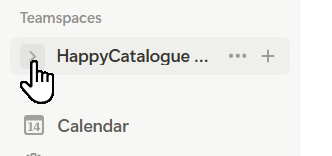
Access your HappyCatalogue CRM in Notion
Expand your workspace and open the Template:
This will be what you named your teamspace in the signup process.
Step 1
Step 2
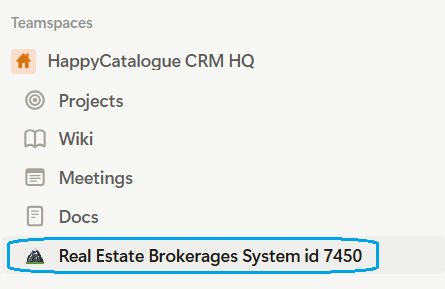
As you start to get emails from us you will learn how to use the System.
To get started right away you can go to the
Real Estate Brokerage System
in your Notion and Open the Help & Training tab right at the Top

CONTACT PAGE
Questions or Comments?
If you have a design project you'd like to discuss or have any questions or comments, please feel free to get in touch. I'm always open to new opportunities and would love to hear from you.
To get started, you can fill out the contact form below or send me an email directly at business@happycatalogue.com. I'll do my best to respond as soon as possible, usually within 24-48 hours.
Full name*
Subject*
Email adress*
Message*
FAQ
Got questions?
We empower businesses by providing a comprehensive database solution called HappyCatalogue, designed to streamline and organize essential business information. Additionally, we help scale operations by implementing powerful sales funnels, making it easier to attract, engage, and convert customers effectively.
Our design services are tailored to integrate seamlessly with powerful platforms like Notion.io and System.io. As affiliates, we recommend the Enterprise plan for those seeking top-tier security and scalability, ensuring your business operates smoothly and securely.
This system streamlines your business operations by centralizing all essential data and tasks in one organized, easily accessible platform. It simplifies property management, client interactions, and task delegation, so you can keep everything organized and at your team’s fingertips. With features like tagging, quick templates, and powerful search tools, it reduces time spent on admin work, enhances team collaboration, and makes it easier to track key milestones—allowing you to focus more on growth and client satisfaction.
Our turnaround time for design projects varies based on the services you select and the level of customization required to tailor the template to your business needs. We’ll provide a more specific timeline once we understand your project requirements and customization goals.
Our design process is tailored to address your specific needs, starting with an in-depth conversation to understand your unique challenges. If administration is an area of concern, we’ll begin by identifying the administrative tasks you find challenging, mapping out the types of data you handle, and analyzing your process flows. For clients focused on improving marketing and reach, we take a different approach, focusing on brand positioning, audience engagement, and strategies to expand your reach. This personalized approach ensures that we design a solution that truly supports your business goals.
Our design projects include a collaborative revision process: we start with an initial version and refine it based on your feedback until you're satisfied. While we work to ensure you're happy with the final result, there is a project timeline or end date to keep the process efficient. If you require ongoing adjustments, we also offer a monthly retainer option tailored to your needs. For a more budget-friendly solution, we also provide a course option—ideal if you have an in-house team that can take the course and implement the design independently.
We accept multiple payment methods for your convenience. If you’re in South Africa, we accept EFT payments. For international clients, we accept credit card payments via PayPal or PayStack.
To get started on a design project with us, keep an eye on your inbox for a form where you can outline your needs. If we believe our services align well with your goals, we’ll reach out to discuss your project in more detail and guide you through the next steps.
Built with systeme.io